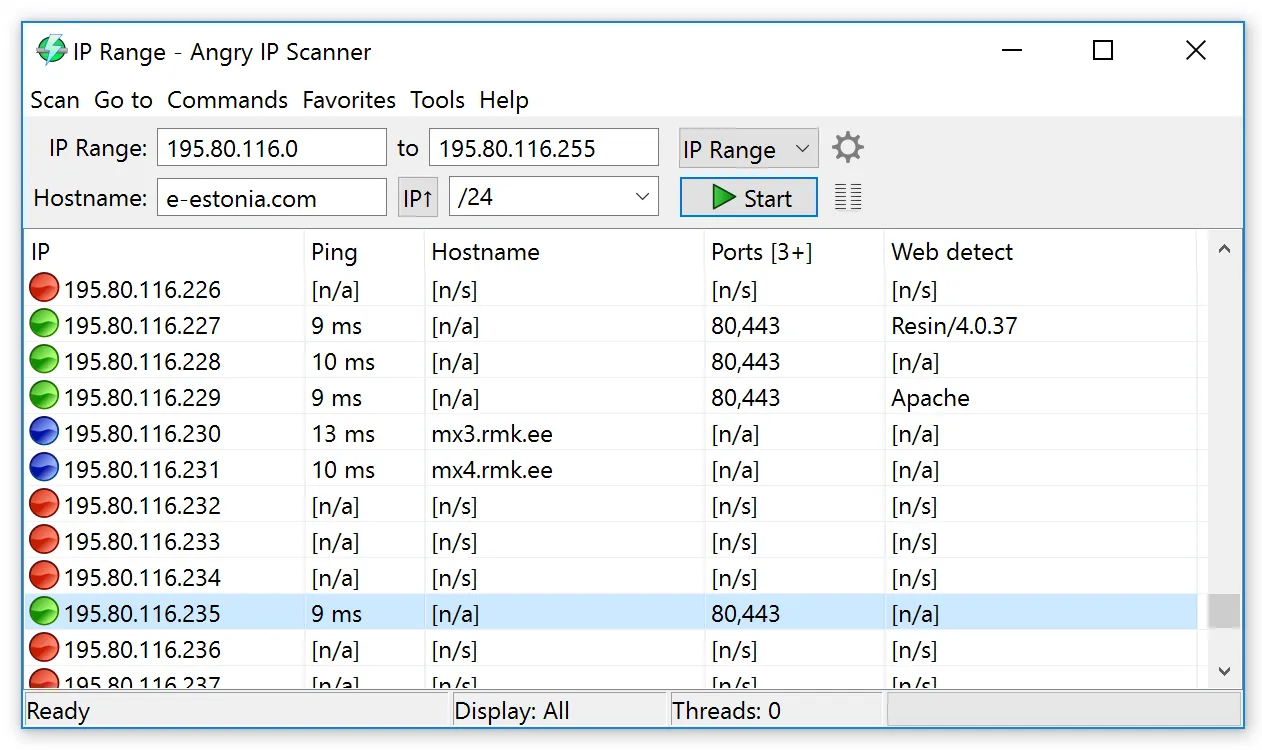
The new client’s office manager hands over a sticky note: “Wi-Fi password, and the printer is 192.168.1.50, I think.” That is the whole of the network documentation, and the contract starts Monday. Before you can plan agent rollout, you need a rough answer to a simple question: what is actually plugged in here? Angry IP Scanner exists for exactly that first hour. It is small, free and fast, and it produces a list you can paste into the onboarding file before lunch.
Use with authorization only. Scan only your own networks or client networks you manage under a signed agreement that covers discovery. Record that authorization in the client file before the first sweep.
What Angry IP Scanner does
Angry IP Scanner is an open-source network scanner written by Anton Keks and released under the GNU GPL version 2. It is a desktop application built in Java, with builds for Windows, macOS and Linux. Depending on the platform and package you choose, a Java runtime may need to be present on the machine; the project’s site lists the requirement for each build, so check it rather than assuming.
You give it a range of addresses — a start and end IP, a subnet, a list of addresses from a text file, or a random sample — and it probes each one in parallel threads. For every address it can report whether the host responded, the round-trip time, the resolved hostname, and, on the local segment, the MAC address and the hardware vendor behind it. Optional “fetchers” add NetBIOS details such as the Windows computer name and workgroup, web server detection, and which TCP ports from your list are open.
Results sit in a sortable grid and export to CSV, plain text, XML or an IP:port list. A command-line mode lets a script run the same sweep on a schedule you control.
Where it earns its place in an MSP toolkit
Speed to a first picture. On a typical /24 office network, a ping sweep with hostname and MAC lookup finishes in a minute or two. For a technician on a first site visit, that is the difference between guessing and having a list of live addresses to reconcile against what the client thinks they own.
Vendor lookup from MAC addresses. The MAC vendor column is quietly one of the most useful. Six addresses resolving to a printer manufacturer, two to a camera brand and one to a single-board computer nobody mentioned tells you where to ask questions.
Port checks that answer practical questions. Adding a short port list (22, 80, 443, 445, 3389, 9100) turns the sweep into a quick map of which devices offer SSH, web management, file sharing, remote desktop or raw printing. That is often enough to find the switch’s management page.
No footprint on the client network. It runs on the technician’s laptop, and when the laptop leaves, so does the tool.
Where it falls short — and who should skip it
It is a snapshot, not a system. There is no central database, no history, no scheduling in the graphical app and no alerts. Run it next month and you have a second spreadsheet to diff by hand. If you need an asset register that stays current, look at Lansweeper; if you need to know when something changes or fails, Auvik or PRTG are built for that.
It sees only what answers. Hosts that drop ICMP and have none of your listed ports open can look dead. Treat “no response” as “unknown”, not “absent”.
MAC data stops at the router. MAC addresses and vendors come from the local segment only; across a router you get IPs and names, not hardware vendors.
No credentials, no depth. It does not log in to anything, so there is no software inventory, serial numbers or configuration.
Security tools may object. Some endpoint protection products flag network scanners as potentially unwanted software, and a client’s managed detection service may raise an alert when a laptop starts probing ports. Warn the client’s security provider first so your sweep does not become their incident.
Skip it if you already run an inventory sensor on every client site.
Who it suits
It fits the one-to-five-person MSP that onboards a few clients a year and wants a quick first pass without buying anything, and the internal IT generalist who inherits an undocumented network. Picture a two-tech shop taking on a twenty-seat accounting firm: an Angry IP Scanner export on day one, reconciled against the client’s asset list, becomes the starting point for the network section of the client onboarding checklist.
Licensing and cost
Angry IP Scanner is free, open-source software under the GNU General Public License version 2. There is no paid edition, trial period or per-device fee, and commercial use by an MSP needs no licence to budget or pass through. The practical costs are a technician’s time and keeping it current. The project is maintained by its author and community, so there is no support contract; questions go through its documentation and issue tracker.
How it compares
Within our network and asset tools section, Angry IP Scanner is the lightest option by a distance. Lansweeper discovers the same devices and then logs in to inventory them in depth, on a schedule, with history. Auvik builds the topology and backs up switch configs. RMM discovery in NinjaOne or Atera needs an agent already on the network, which is no help on the first visit. When a sweep shows a device that behaves oddly, Wireshark is the natural next step for seeing what it is actually sending.
Getting it safely
We host nothing. Get Angry IP Scanner from the project’s own site, angryip.org, which links to the official release pages; avoid mirror sites that repackage popular free tools with bundled adware. Where a checksum is published for a release, compare it before running the file. Our where to get page walks through verifying a file’s signature and SHA-256 hash on Windows, macOS and Linux.
FAQ
Is Angry IP Scanner safe to run on a client network?
The risk lies in where you get it and where you point it. Obtain it from angryip.org, verify the file, scan only networks covered by a written agreement, and tell the client’s security provider beforehand.
Does Angry IP Scanner need Java?
It is a Java application. Whether you need to add a Java runtime yourself depends on the platform and package; the project’s site states the requirement for each build.
Can I schedule scans?
Not from the graphical app. The command-line mode can be run from a scheduled task or cron job, with results exported to a file, which is enough for a simple monthly comparison.